
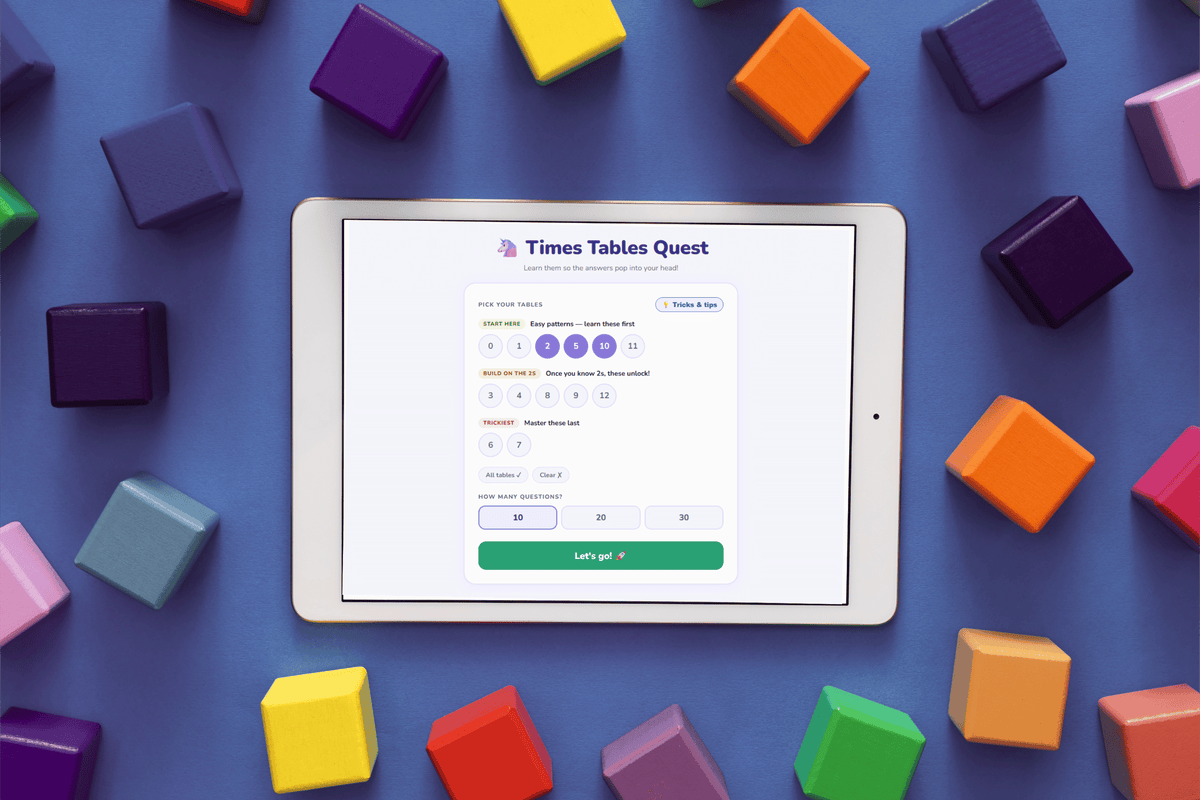
I Built My Daughter a Custom Learning Game. It Cost Nothing and Took 10 Minutes.
How I used AI to build my daughter three learning tools — in about 10 minutes each. No apps. No ads. No login. Just games.
My daughter told me she didn't feel confident with her times tables. She had a test coming up, and she knew it. So we did what parents have done foreve; practice on paper, writing them out again and again. But those numbers just weren't sticking.
Her school suggested a game. I pulled it up, and immediately hit a login screen. Then another screen. Then an ad. Then a menu with about forty things on it, none of which were "just let my kid practice multiplications right now." We tried a couple of other apps. Same story - ads every five minutes, rabbit holes of other games to click into, and one school-recommended app that had a chat feature for young kids. I'm not even going to finish that sentence.
- Login screens before she can even start
- Ads every few minutes — unless you subscribe. No thanks, not everything needs to be a subscription
- Other games visible and clickable (goodbye, focus)
- No practical strategies for how to reach an answer
- Chat features on platforms used by young children
I just wanted something clean. No distractions. No data collection. No login. Just: here are the times tables, let's go.
The Lightbulb Moment
That same day, I'd been using Claude (an AI tool) to help me plan and schedule my social media content for Tudrimi. At some point I asked it to make the planner interactive, so I could move posts around and track prep work visually. And it built me an HTML file that I could open in any browser, right on my phone or laptop.
So I did. I typed a simple prompt; genuinely, nothing fancy and within a few minutes I had a custom multiplication game. No login. No ads. Opens straight in a browser. Works on her tablet, my phone, the laptop at school, anywhere.
But here's where it got really good. I could personalise it. The standard apps don't teach strategy. they just throw sums at you and mark you right or wrong. So I asked the AI to add practical tips: ways to reach an answer from a starting point you already know.
For example: if your child gets stuck on 6×7, but they know 6×6, they can just add one more 6 to get to 42. Obvious when you read it as an adult. But for a kid, that connection, being able to work something out rather than just retrieve it from memory, is genuinely empowering. It's the difference between feeling stuck and feeling like a problem solver.
No app we tried did that. They just said wrong, try again.
Not just a multiplication game, a personalised learning tool, built in minutes, free, and designed exactly for her.
What I've Built Since
Once I realised this was possible, I didn't stop at one game. Here's what I've made for my daughter so far... each one below is a short demo video so you can see what they actually look like:
And that's just the start. I'm already planning a game that helps her revise her full year of learning, not just maths. The same approach works for phonics, spelling, science facts, geography, anything your kid is working on right now.
How You Can Do This Too
I'm going to be honest with you: I am not a prompt expert. I genuinely don't have time to be one. I just type what I need, as clearly as I can, and see what comes back. Sometimes I tweak it. Sometimes the first version is already good enough. That's it.
Here are my actual prompts, typos and all. Because if I cleaned them up into something polished, that would miss the whole point.
The Multiplication Game
"create an html game for an 8-year-old to learn multiplication tables from 0-12 times tables"
That one line started the whole thing. From there I kept the conversation going; tweaking, refining, asking for strategy tips to be added, telling it what I didn't want. Watch the demo below to see how the chat developed:
Want to go deeper on prompts? I've put together a download with my refined prompts for all three tools - ready to copy, paste, and make your own.
Download the Prompt Guide
All three prompts, refined and ready to use. Copy, paste, and tweak for your own kids.
Download PDFThe Piggy Bank Savings Tracker
"create an independent and downloadable html for kids saving. so for example my daughter is saving for a needoh, so i want the shape of the piggy bank to be a needoh. have somewhere the amount to be saved, and then i want quick clicks of if she did a chore - be able to set the cost of a chore, or if she gets money as a gift to be able to do a deposit. i want a settings tab so parents can adjust"
I described exactly what my daughter was saving for, how she earns money, and what I needed as a parent to manage it. The AI built it around that. It's not a generic piggy bank, it's her piggy bank, saving for her specific toy.
The Spelling Game
"create an independent and downloadable html game like app for kids spelling to cover basic words for up to year 3 primary school in UK education system. have common words, frequently used words etc. have it broken down by age or year, difficulty, and variations of missing letters, or picture and you spell from the beginning, or right and wrong spelling etc"
I told it the UK curriculum year, the age range, and the different ways I wanted kids to be tested. It figured out the word lists, the difficulty levels, all of it. I didn't have to research any of that myself.
Whatever idea you have, write it down like you'd explain it to a friend. Give it an age, a subject, a goal. Mention anything you don't want. That's genuinely all it takes.
How It Works
The AI builds you an HTML file. You save it to your device - phone, tablet, laptop, anything. It opens in any browser. No internet connection needed once it's saved. No login. No subscription. No ads. It just works.
Want to update it or change something? Go back to the AI, describe what you want changed, get a new version, save it again. Each person saves their own copy, with their own progress stored on their own device.
More Ideas to Get You Started
- Times tables game — customise the tables, add strategy tips for your child's specific gaps
- Spelling quiz — use your child's actual school word list from this term
- Year review quiz — based on everything they've covered this school year
- Savings tracker — set their savings goal, track chore earnings and gifts
- Pocket money budgeting tool — spend, save, give
- Language learning flashcards — French, Spanish, whatever they're studying
- Phonics practice — letter sounds, blends, digraphs by phase
- Countdown timer for homework sprints with a reward screen at the end
I've made all three tools available to download below. Save them to your device - they work offline, no login, no subscription, no ads. Use them as they are, or take them into an AI tool and ask it to tweak them for your own kids.
And if you build something - I want to see it. Come find me on Instagram @tudrimi.
Download the Free Tools
Save to your device. Works offline. No login, no subscription, no ads.
Be the First to Comment!